Privacy by design
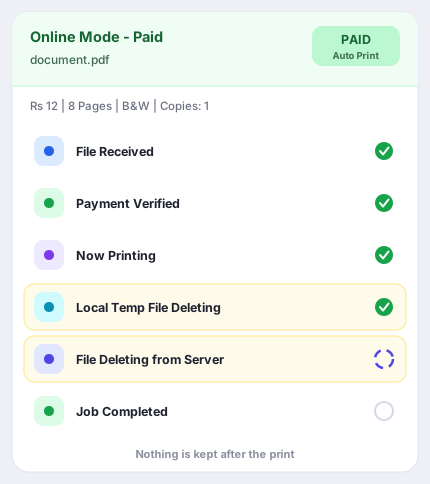
Files automatically deleted from the server and the shop owner's computer immediately after print
QRBD
—SCAN•UPLOAD•PAY•PRINT—
Customer ke phone se Print seedha aapke printer par
No WhatsApp•No Pendrive•No File Transfer
SCANQR Code
UPLOADDocument
PAYOnline
AUTO PRINTInstantly
Smart Printing Solution for Print Shops, Cyber Cafes, CSC Centers & More
All Printer Supported
No Wi-Fi Printer Required
Black & White & Color Print
Setup in 2 Minutes
1000+
Shops Onboarded
500K+
Documents Printed
98%+
Happy Customers
🇮🇳
Made inJharkhand, India
🎬 Setup Kaise Karein
2 Minute Mein Poora Setup Dekh Lo
Browser autoplay policy ki wajah se video muted shuru hoti hai — awaaz on karne ke liye button dabao
Setup me koi dikkat aaye to Contact Us se seedha humse baat karo
⭐ Shop Owners Kya Kehte Hain
0★★★★★(0 reviews)
🎁 Sirf Print Nahi — Poori Dukaan Ka System
Jo-jo milta hai, sab ek jagah
PRIVACY BY DESIGN
We never keep your file
Your document is deleted the moment printing finishes — from the shop’s computer and from our server. Anything left over is wiped the same night at 11:59 PM.
🗑
Deleted from the shop’s PC
The temporary file is wiped from the shop’s
computer as soon as the print comes out.
☁
Deleted from our server
The same job is removed from our server right
after. No copy is left behind.
👁
You can watch it happen
The print window shows every step live —
including both delete steps.
No copies. Your file is never backed up — only account and job records are, and job records are cleared every Sunday.
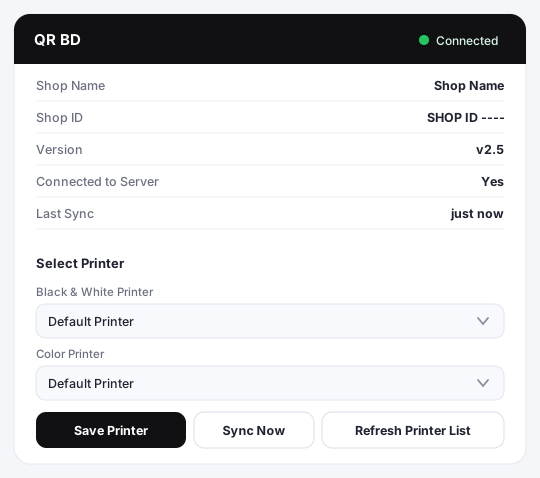
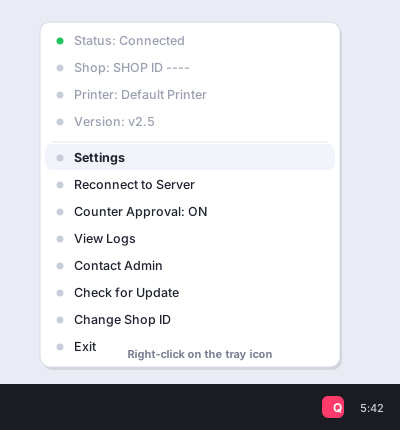
Inside the software
This is what the shop owner actually sees on their computer
💰 Apna Plan Chuno
🎯 Demo
₹0
Try karke dekho — bina paisa diye
- ✅ Demo Auto Print Software
- ✅ Personalize QR For Shop
- ✅ 24 Ghante · 20 Print
- ✅ Setup Guide (README) included
📅 Monthly
₹99/month
Har mahine renew — jab chaho band karo
- ✅ Auto Print Software
- ✅ Personalized QR For Shop
- ✅ Unlimited Print
- ✅ Advance Feature UNLOCKED — Duplex · 4×6 Photo · A3 · Resume Maker
- ✅ Smart Scanner — FREE
- ✅ Aane wale SAARE naye feature — FREE
- ✅ 5 Printer Connect — B&W · Color · A3 · Duplex · 4×6 Photo
- ✅ Assistant in Setup
- ✅ WhatsApp Assistant
Saare Advance Feature + Smart Scanner + aane wale naye feature — sab FREE, mahine ke hisaab se
Upgrade Your Shop to Smart Printing
🚀 Starter
₹649/year
Yearly — saal me ek baar renew
- ✅ Auto Print Software
- ✅ Personalized QR For Shop
- ✅ Unlimited Print
- ✅ 2 Printer Connect — 1 B&W + 1 Color
- ✅ Assistant in Setup
- ✅ WhatsApp Assistant
Advance Feature isme nahi hai — baad me ₹199 me alag se unlock kar sakte ho
Upgrade Your Shop to Smart Printing
💎 Pro
₹799/year
Yearly — saal me ek baar renew
- ✅ Starter ka sab kuch
- ✅ 2 Printer Connect — 1 B&W + 1 Color
- ✅ Assistant in Online Payment Gateway Setup
- ✅ Bug Fix Within 2 Hr
- ✅ AnyDesk Assistant
Advance Feature isme nahi hai — baad me ₹199 me alag se unlock kar sakte ho
Upgrade Your Shop to Smart Printing
👑 Premium
₹999/year
Yearly — aaj ka bhi, aane wala bhi
- ✅ Pro ka sab kuch
- ✅ Advance Feature UNLOCKED — Duplex · 4×6 Photo · A3 · Resume Maker
- ✅ Smart Scanner — Premium aur Lifetime me FREE
- ✅ Aane wale SAARE naye feature — FREE
- ✅ 5 Printer Connect — B&W · Color · A3 · Duplex · 4×6 Photo
- ✅ Priority Support
Aaj ke bhi, kal ke bhi. Jo bhi naya advance feature banega, apne aap mil jayega — saal me bas ek baar renew.
Upgrade Your Shop to Smart Printing
👑 BEST VALUE
♾️ Lifetime
₹1999one-time
Ek baar pay — hamesha ke liye, koi renewal nahi
- ✅ Premium ka sab kuch — Lifetime
- ✅ Advance Feature UNLOCKED — Duplex · 4×6 Photo · A3 · Resume Maker
- ✅ Smart Scanner — FREE
- ✅ Aane wale SAARE naye feature — FREE
- ✅ 5 Printer Connect — B&W · Color · A3 · Duplex · 4×6 Photo
- ✅ Kabhi dobara koi payment nahi
- ✅ Priority Support
Premium ke saare feature, ek baar ka paisa. Na saal ka renewal, na mahine ka — Lifetime access.
Upgrade Your Shop to Smart Printing
Demo Testing
WhatsApp To Print
No app and no website for your customer. They scan your QR, WhatsApp opens with the message already typed, they send the file — and the print comes out at your counter.
- 1 The customer scans the shop's QR code
- 2 WhatsApp opens with "Hello Print" already typed
- 3 They send the document — PDF, JPG or PNG
- 4 They reply with the number for colour and copies
- 5 The print comes out on your printer, the file is deleted
What WhatsApp's own API would cost you every month
Every reply the bot sends is a paid conversation on Meta's API. This is roughly what a shop would pay:
| Customers / day | Customers / month | Bot messages / month | Meta charge / month | Per day |
|---|---|---|---|---|
| 20 | 600 | 4,800 | ₹552 | ₹18.40 |
| 30 | 900 | 7,200 | ₹828 | ₹27.60 |
| 50 | 1,500 | 12,000 | ₹1,380 | ₹46 |
| 100 | 3,000 | 24,000 | ₹2,760 | ₹92 |
Approximate Meta conversation charges. Your real bill depends on how many customers message you and what type of message it is.
Our price is not monthly — it is yearly
₹ • • • •
Unlimited Print, Unlimited Customer
Price revealing soon
Requirements & how to set up — please read before you register
🔒
Planned Payment Options
Support for popular Bangladesh Mobile Financial Services (MFS) is currently in development
bKash
Planned
Nagad
Planned
Rocket
Planned
Upay
Planned
Direct payment gateway integration is currently in development. Participating shops accept cash at the counter or direct shop MFS. No live automated checkout is active on this landing page.